Lists in Python

Lists are one of the most important and commonly used data structures in Python. They allow you to store multiple values in a single variable and work with them efficiently. Today, we'll explore some of the characteristics of this particular data type.
Definition
A list is a collection of items in a particular order. These items do not need to be related in any particular way. In Python, we use square brackets ([]) to indicate a list. For example:
weekend = ['Saturday', 'Sunday'];Lists can also store different data types.
user = ['Steve', 32, True];Accessing Elements
We use number indexes to access every element in a list. Just like many programming languages, elements start at index zero.
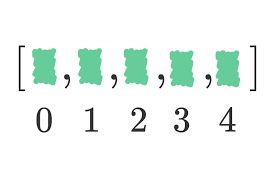
The following code will print "trek".
bicycles = ['trek', 'cannondale', 'redline', 'specialized'];
print(bicycles[0]);  # trek
To access the last element in a list we use the index -1.
print(bicycles[-1]); # specialized
The index -2 will access the second value from the end of the list.
print(bicycles[-2]); # redline
We can also extract a portion of the list. The following code will extract elements at positions 1 and 2 into a new list.
bicycles[1:3];
Modifying and adding elements
To modify an element, we can use the index of the element and assign the new value to the list item as follows:
bicycles[0] = 'giant';
To append elements to the list, we can use the method append. This will add the element at the end of the list.
bicycles.append('bianchi');
We can also add multiples elements with extend.
bicycles.extend(['scott', 'bmc']);
It is possible to add an element in a specific position of the list. To do that, we can use the method insert. The following code will add a new element at index 1; the operation shifts every other value in the list one position to the right.
letters = ['a', 'c', 'd'];
letters.insert(1, 'b');
The result list of this example will be:
['a', 'b', 'c', 'd']Removing elements
The easiest way to eliminate one item from the list is to use the method remove.
letters = ['a', 'c', 'd'];
letters.remove('c');
This operation shifts every other value in the list one position to the left, from where the element is removed. On the other hand, if we know the index of the element, we can use del instead.
letters = ['a', 'c', 'd'];
del letters[1];
The pop method also removes an element by index, but it returns the removed value.
letters = ['a', 'c', 'd'];
letters.pop(1);   # returns 'c'
Finally, if we want to wipe out everything inside the list we can use clear.
letters = ['a', 'c', 'd'];
letters.clear();
Iterating Over a List
Given the list
fruits = ['apple', 'pear', 'lemon']We can iterate over that list as follows:
for fruit in fruits:
    print(fruit)
If indexes are required for iteration, we could take advantage of an enumerate object.
for index, value in enumerate(fruits):
    print(index, value)